Helping working parents coordinate everyday family life
Designing an AI companion that reduces the mental load of working parents, not by making
decisions for them, but by helping them make better ones.
*Client name changed to protect confidentiality.
The 90-second version
Problem
Working parents were already using AI at work, but rarely at home. The team wanted to know if there was a real opportunity for AI to reduce family mental load, or if that assumption was wrong.
Method
Literature review, competitive scan, 7 parent interviews, affinity mapping, concept prototyping, usability testing, over 4 months.
Finding
Parents didn't want another app or more automation: they wanted less coordination effort. Trust, not capability, was the real adoption barrier.
Outcome
Research and prototypes shifted the product direction away from a planning tool toward a trust-first coordination layer, and were used directly in the client's fundraising pitch deck.
7
interviews
4
months
3
concepts tested
Role
UX Researcher (research lead)
Timeline
4 months, 2025
Team
Rivers Agile: UX, Project Manager, Engineer
Client
Project Daylight*
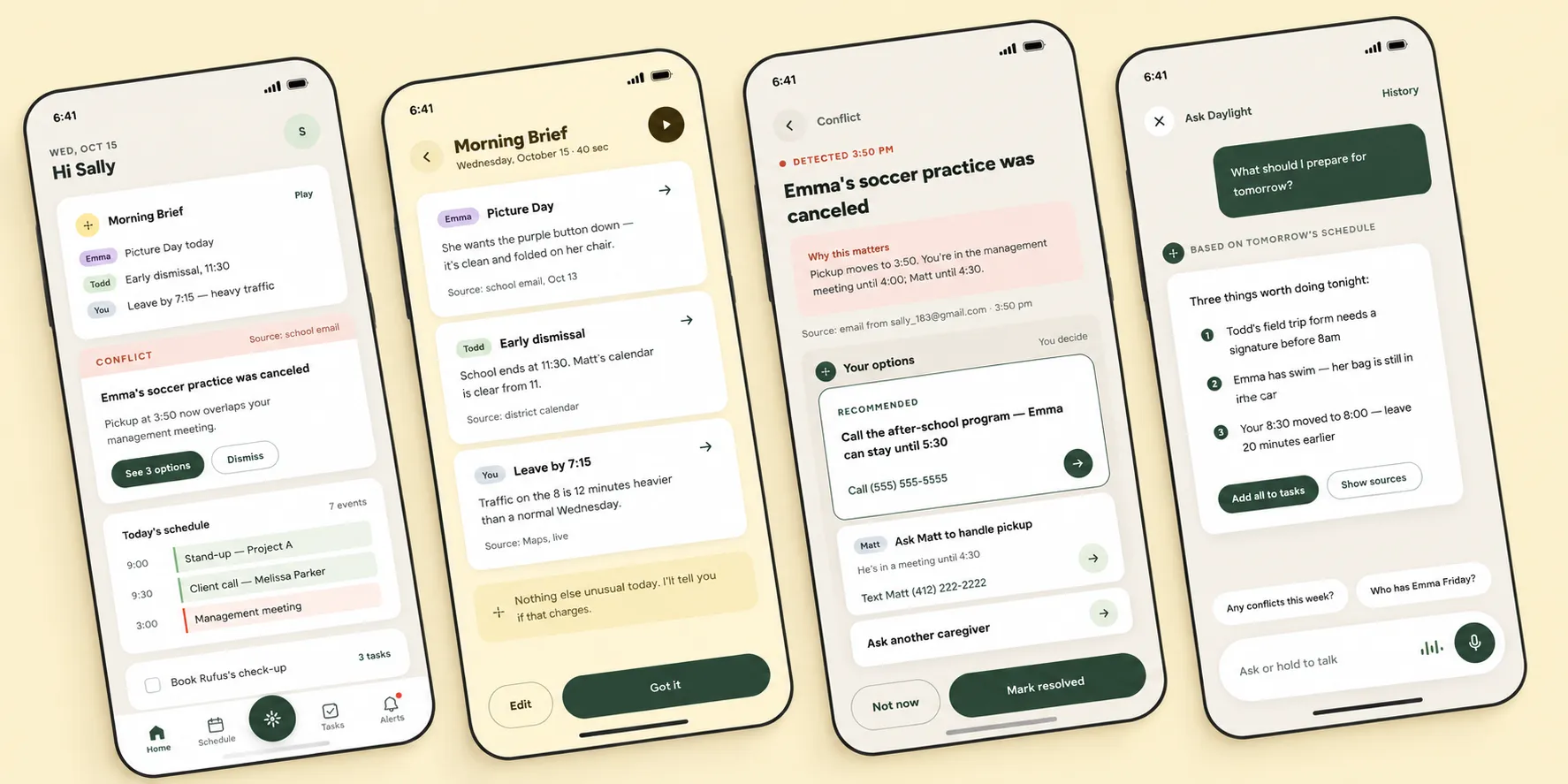
The Daylight app: home screen, morning brief, conflict resolution, and the Ask Daylight assistant.
Overview
Working parents make hundreds of small decisions a day: some visible (school pickup,
dinner), most invisible (permission slips, schedule conflicts, remembering what's coming
next). Parents already had tools to manage this: calendars, reminder apps, school portals,
group chats. The question wasn't whether tools existed. It was whether AI could
meaningfully reduce the effort of holding it all together.
Rather than starting from a product idea, I started from research: testing whether AI had
a real role to play here, or whether that assumption itself was wrong.
My role
I led research and prototyping independently within a three-person team (myself, a
Product Manager, and an Engineer) working with Project Daylight as the client. Specifically, I:
Designed and ran all 7 parent interviews
Synthesized findings through affinity mapping
Translated research into three concept directions
Built and usability-tested the prototypes
Prepared the research and design deliverables the client used directly in their fundraising materials
Interviews
→
Synthesis
→
Concepts
→
Prototyping
→
Usability testing
→
Pitch deck
Research approach
What the research ruled out, and what it pointed toward instead.
01 — RESEARCH
The assumption that didn't hold
Going in, the working theory was that parents needed better tools to organize information.
The interviews said otherwise. Parents already had systems that worked well enough: Google
Calendar, paper planners, dry-erase boards, group texts. The problem wasn't a missing tool.
It was that none of these tools talked to each other, and parents had become the manual
bridge between them.
WHAT I WANTED TO UNDERSTAND
Where does the mental load of family coordination actually come from?
How are parents managing it today, and where do existing tools fall short?
Where could AI meaningfully reduce that effort — and where would parents rather stay in control?
WHO I SPOKE WITH
7 working parents · 5 dual-income / 2 single-income · children ages 3–12 · most with 2+ children
Participants represented a mix of primary, shared, and secondary caregiving roles.
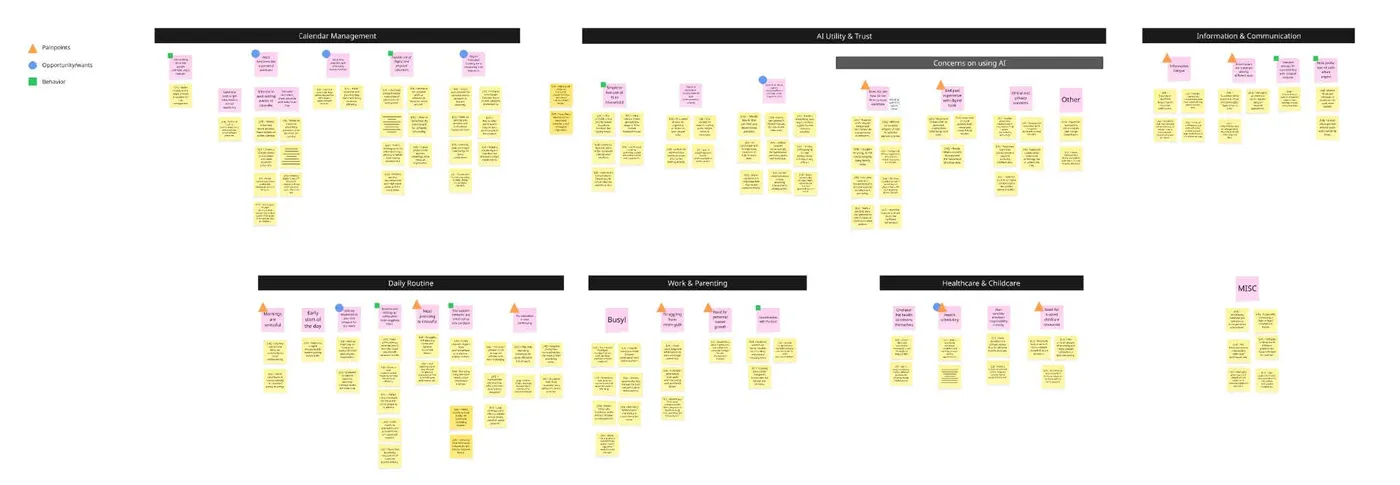
Affinity map synthesizing parent interviews into themes: calendar management, AI utility and trust, daily routine, and more.
Key findings
1
Coordination fragmentation: Information lived across too many systems.
Parents already had tools that worked; the burden was manually connecting information across calendars, school portals, group chats, and other systems.
2
Trust & control: Parents wanted assistance without giving up control.
They welcomed help with tedious, low-risk tasks, but wanted to stay in control of decisions around childcare, medical care, and family priorities.
3
Invisible mental load: Remembering and reconciling information was itself work.
The burden wasn't just completing tasks, but tracking what was coming, noticing changes, resolving conflicts, and making sure nothing slipped through.
4
AI utility gap: AI hadn't yet proven its value at home.
Parents used AI confidently at work, but hadn't found a compelling household use, not necessarily from distrust, but because it hadn't meaningfully reduced their effort.
“Until AI can get my son to take a bath, you're not really helping me out.”
— parent, interview
This one insight reframed the entire project. The team wasn't looking for a gap in the market
for another app. It was looking for where AI could reduce the coordination work
itself, quietly, in the background, without asking parents to manage one more
thing .
Together, these findings ruled out a "personal assistant that manages the family" direction,
and pointed instead toward AI as a quiet layer that surfaces information without taking over
decisions.
02 — DESIGN DIRECTION
Turning research into product possibilities
The research reframed the product goal: not another planner, but an easier way to make
sense of everything already coming in. With that direction established, the client wanted
to explore what reducing coordination effort could actually look like in practice. I
translated the findings into three early concepts, each addressing a different moment in
parents' daily routines.
Early concepts focused on helping parents:
See important updates and changes at a glance
Reduce the effort of piecing together scattered information
Catch conflicts before they became stressful
Feel confident nothing important had slipped through
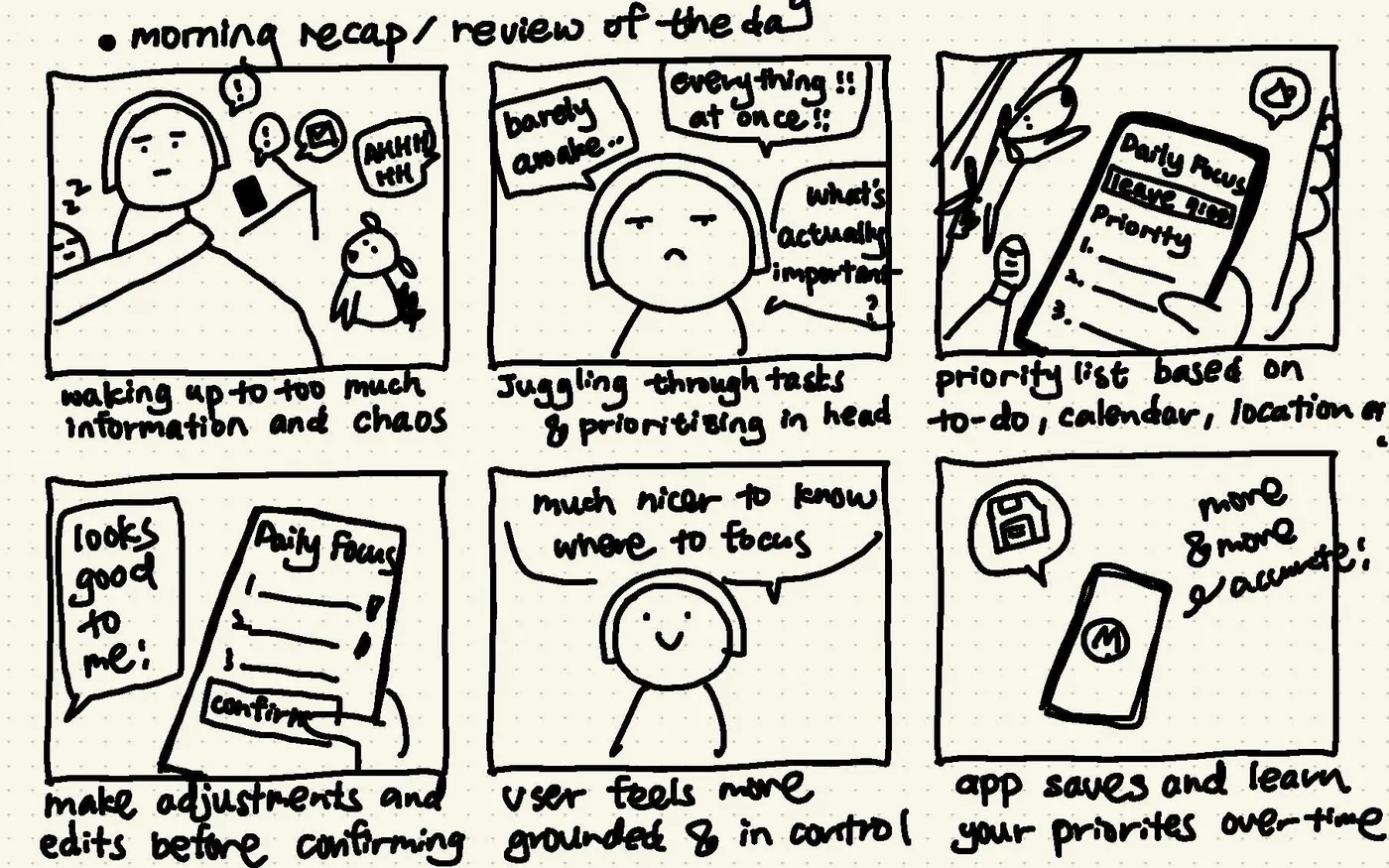
Concept 1 — Morning Recap / Daily Focus
Surfaces only the most important or unusual items for the day, shifting prioritization
from the parent's head to a supportive system.
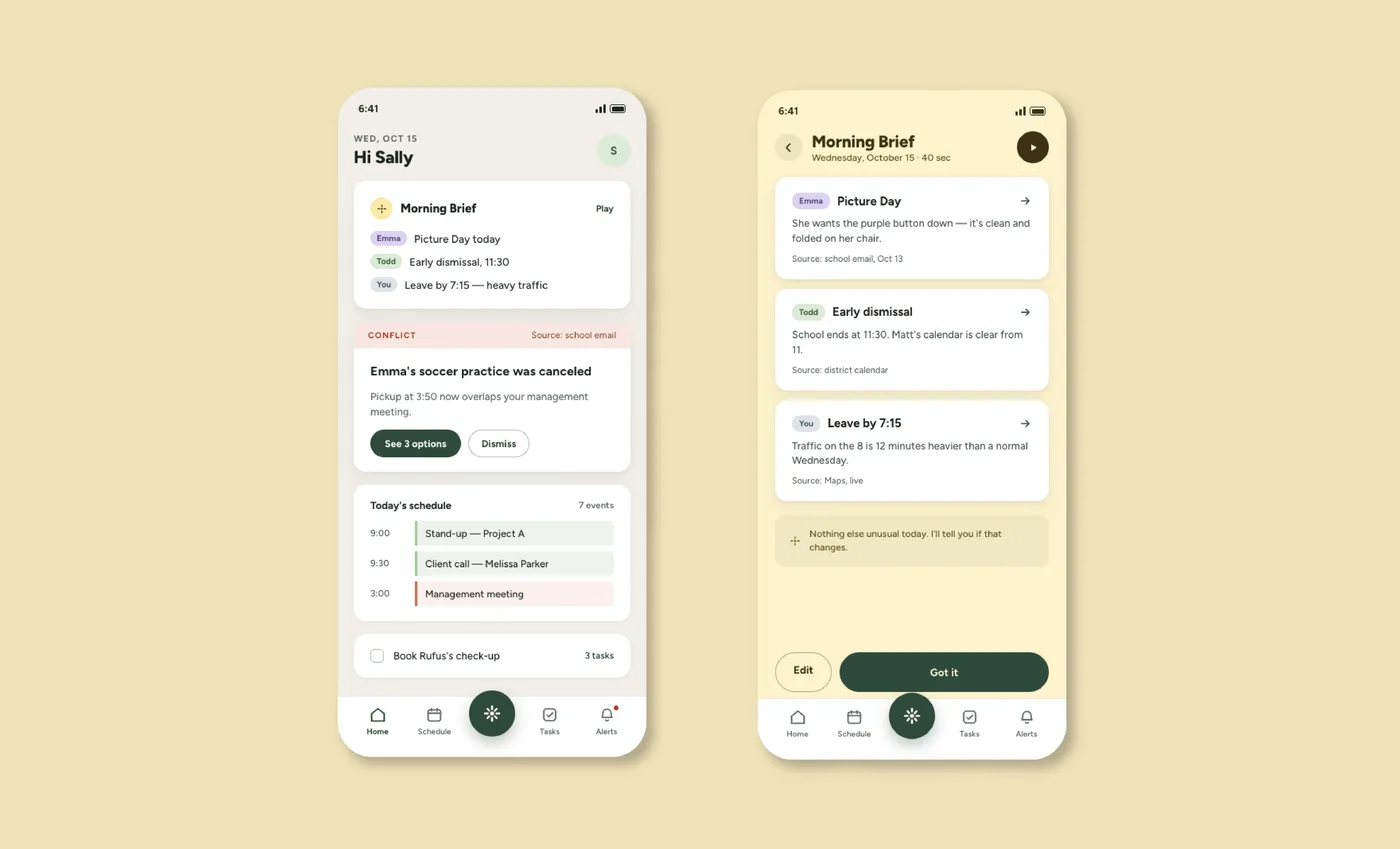
Early storyboard for Morning Recap: surfacing what matters most before the day gets going.Morning Brief mockup: today's key updates and a detected schedule conflict, front and center.
Concept 2 — Conflict Resolution & Problem Solving
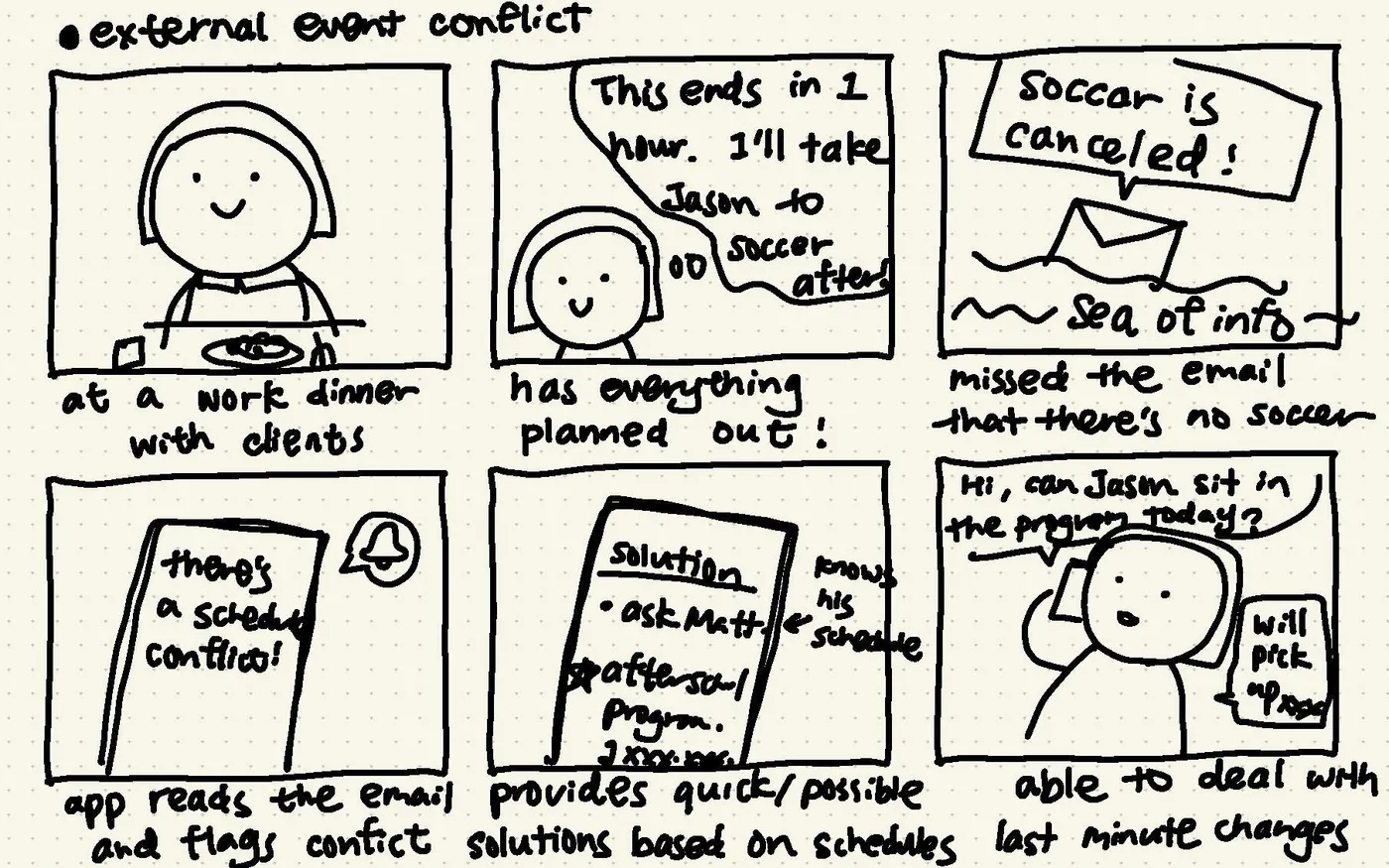
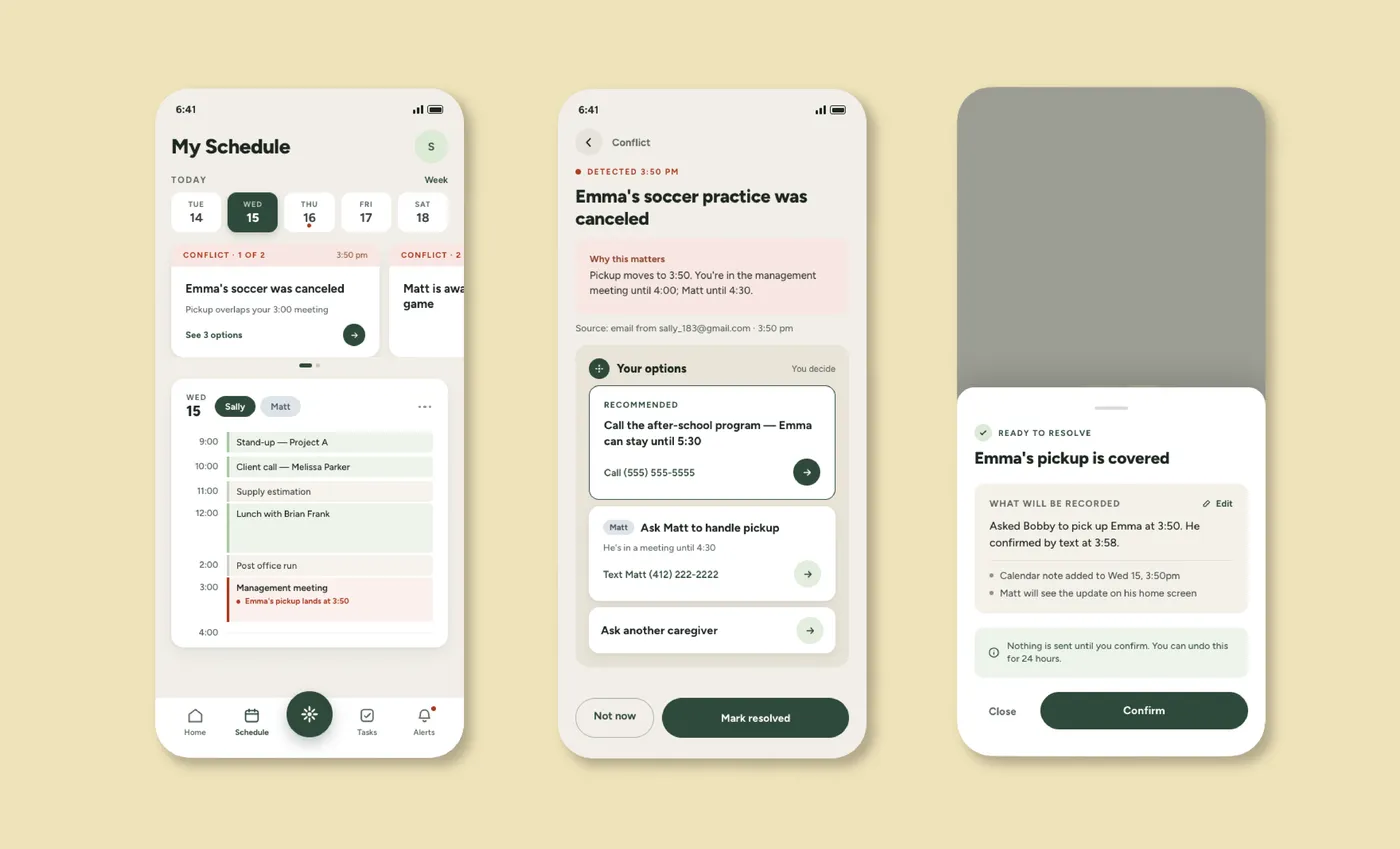
Detects schedule conflicts or disruptions (a canceled activity, an overlapping
commitment) and surfaces context and options, without resolving it automatically.
Early storyboard for Conflict Resolution: flagging a canceled activity and suggesting who can cover it.Conflict resolution mockup: the app flags a conflict, recommends a fix, and confirms before anything is sent.
Concept 3 — Evening Wind Down & Reflection
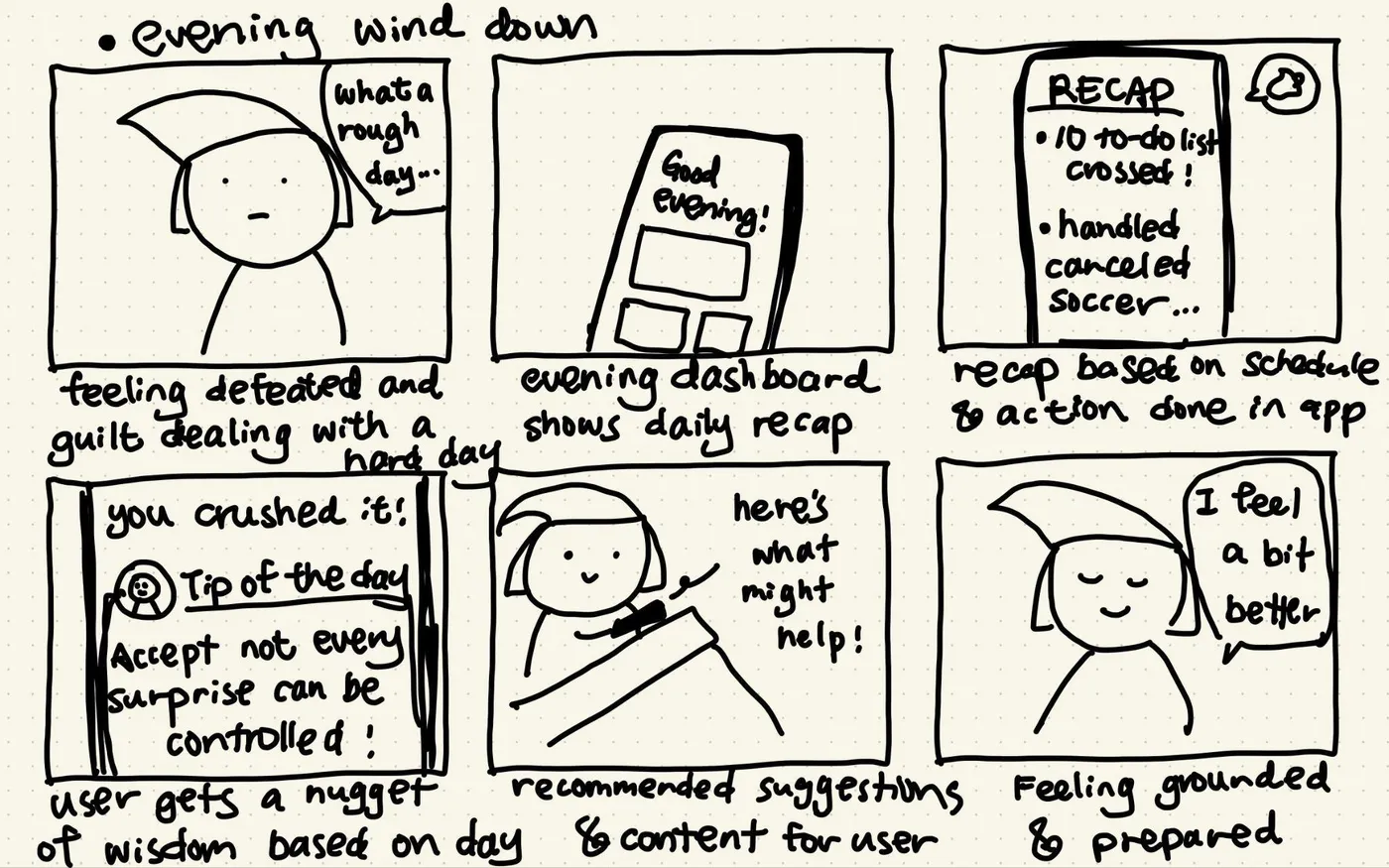
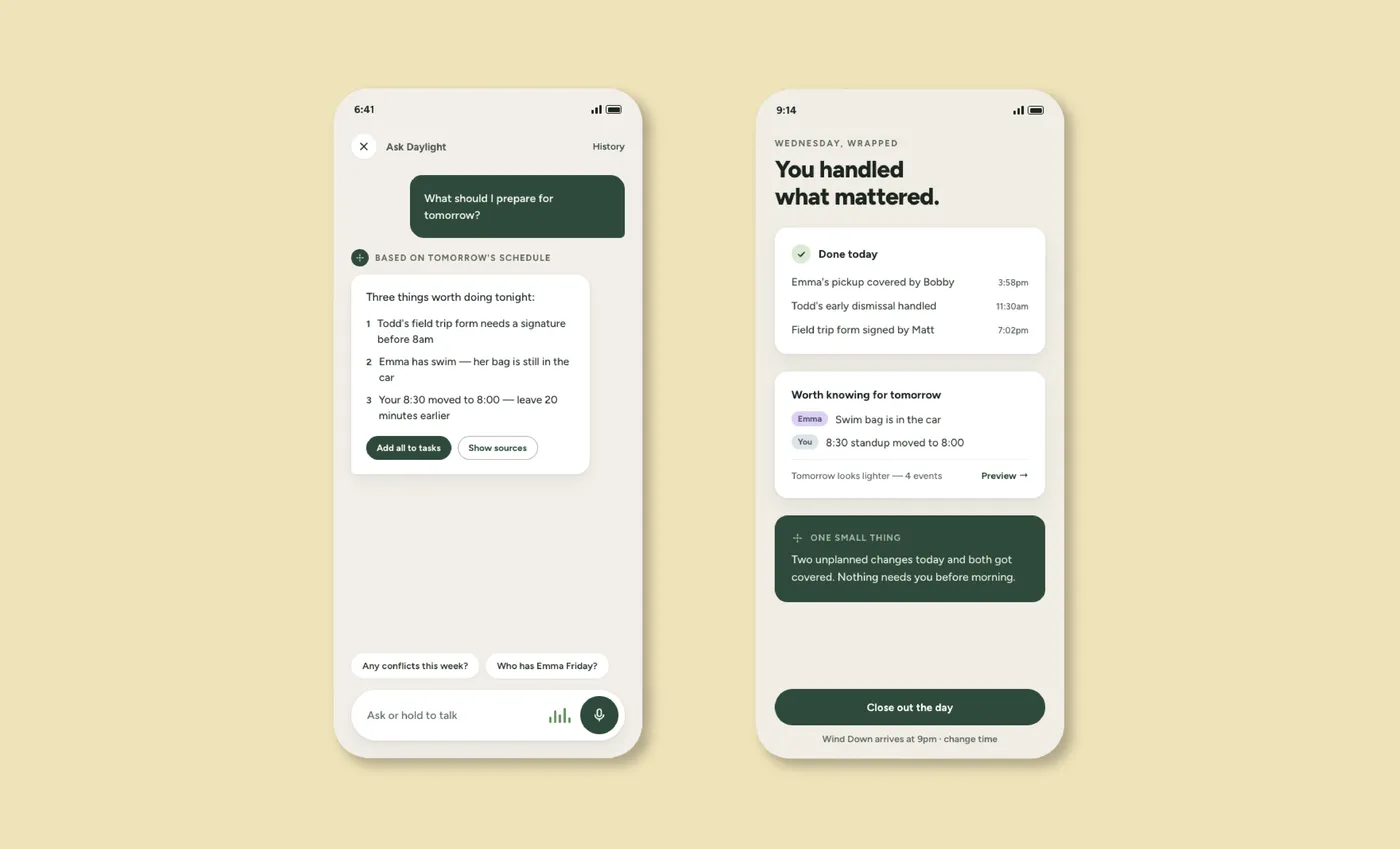
Addresses the emotional side of mental load: a short recap and light reflection to help
parents close the day feeling grounded rather than guilty.
Early storyboard for Evening Wind Down: a recap and a small nugget of encouragement to close the day.Evening Wind Down mockup: asking Daylight for tomorrow's prep, and a wrapped recap of what got handled today.
Outcome
The three concepts were usability tested with parents. People understood the concepts
quickly, but testing surfaced an important open question: whether the seamlessness of
pulling information from multiple existing tools (the core promise of the product) could
actually be delivered without adding friction of its own. That tension became a key input
for the client's next phase of technical scoping.
The research, concepts, and prototypes were handed off to Project Daylight and used
directly in the company's fundraising pitch deck to begin raising capital.
Before
Planning tool for organizing family logistics
→
After
Trust-first coordination layer that quietly reduces mental load
Reflection
This project changed direction a few times, and I think that's part of what made it so
interesting. Each time we thought we understood where AI could help, the research gave us
a reason to look at the problem differently. By the end, the question wasn't really
“What can AI do for parents?” but “What would actually make this part of
their lives easier?” That felt like a much better question to be designing around.
— Grace, UX Researcher & Service Designer
There's always more to the story.
Curious about the research, decisions, or what happened behind the scenes? I'd love to chat.